
WooCommerce
What is WooCommerce Catalog Mode and Why Dealers Use It
Published 20 Aug 2026 · Updated 20 Aug 2026 · Bala, BRUsoft

What is WooCommerce Catalog Mode?
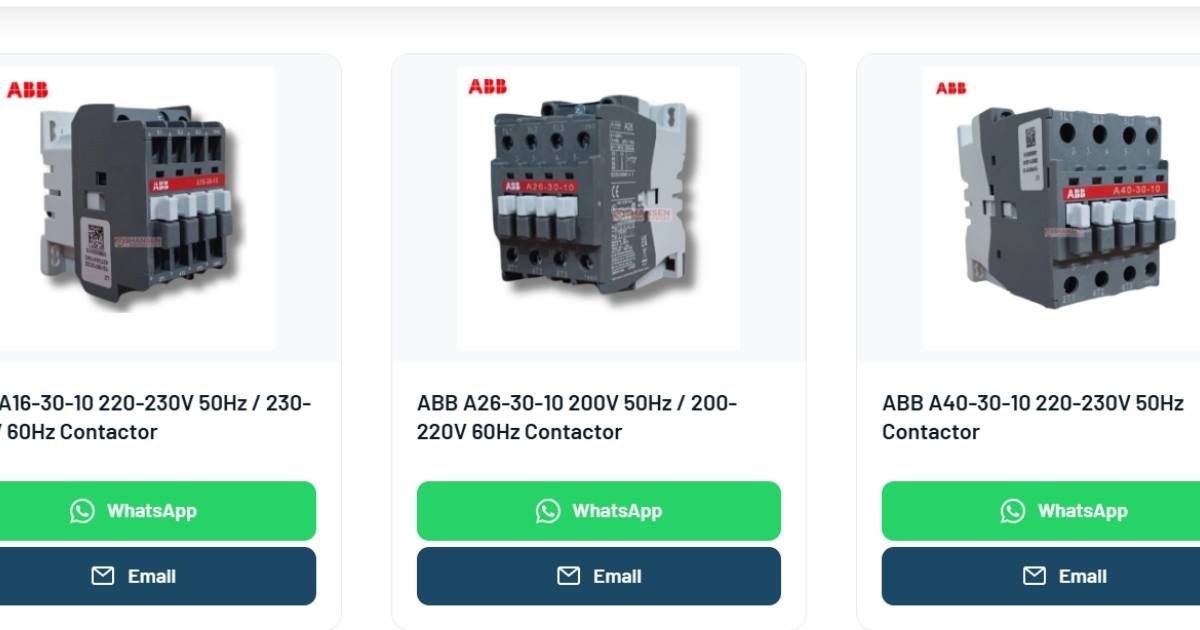
WooCommerce is the most widely used e-commerce platform built on WordPress. It powers online stores with product pages, shopping carts, checkout, and payment gateways. WooCommerce Catalog Mode removes the selling part while keeping everything else. When catalog mode is enabled, your website displays your full product range with descriptions, specifications, images, and categories — but without prices, Add to Cart buttons, or checkout. Visitors can browse your entire inventory, read product details, and then contact you directly through WhatsApp or an enquiry form to discuss pricing and place orders. Think of it as a digital showroom rather than an online shop.How is Catalog Mode Different from a Regular Website?
A regular company website might have a “Products” page with a few images and a paragraph of text. That is not enough when you represent brands with hundreds or thousands of SKUs across multiple categories. WooCommerce Catalog Mode gives you the full product management system of an online store:- Individual product pages with detailed specifications
- Product categories and subcategories for organised browsing
- Search and filter functionality so buyers find what they need
- Product image galleries
- Technical specification tables and downloadable datasheets
- Related product suggestions
Instant Enquiry Via WhatsApp
Why Authorised Dealers and Distributors Choose Catalog Mode
OEM Pricing Restrictions
Most authorised dealers sign agreements that prevent them from displaying prices publicly. Festo, Janatics, Eaton, Havells, Crompton, and dozens of other industrial brands have strict channel pricing policies. Catalog mode lets you showcase the full product range without violating any agreement.Products Require Technical Consultation
Industrial products — pneumatic cylinders, circuit breakers, sensors, drives — are not impulse purchases. Buyers need to confirm compatibility, specifications, and quantities before ordering. A WhatsApp enquiry button on every product page opens a direct conversation where you can provide expert guidance, something no shopping cart can replace.Pricing Depends on Quantity and Relationship
B2B pricing is rarely fixed. It depends on order volume, payment terms, delivery location, annual purchase commitments, and the relationship between dealer and buyer. Displaying a single price would either scare away bulk buyers or undercut your margins on small orders.You Want Enquiries, Not Anonymous Orders
As a dealer, you want to know who is buying, what they need, and how much they need before committing stock and pricing. Catalog mode naturally filters casual browsers from serious buyers. When someone takes the effort to contact you through WhatsApp or a contact form, they are a qualified lead.Your Competitors Are Still Using PDF Catalogues
Most authorised dealers in India still rely on printed brochures, PDF catalogues shared via WhatsApp, or a basic website with no product pages. A catalog mode website with hundreds of properly listed products gives you a visibility advantage that compounds over time through search engine rankings.Who Should Use WooCommerce Catalog Mode?
Catalog mode is ideal for:- Authorised dealers of industrial, electrical, and mechanical brands
- Industrial distributors handling multiple brand lines
- Manufacturers who sell through channel partners and do not want direct pricing online
- Wholesale suppliers where minimum order quantities and negotiated rates apply
- B2B companies in any sector where products need consultation before purchase
What a Dealer Catalog Mode Website Looks Like in Practice
A well-built catalog mode website for an authorised dealer typically includes: Product catalogue — Every product listed with its model number, brand, specifications, and images. Organised into categories that match how buyers search — by brand, by product type, by application. WhatsApp integration — A WhatsApp button on every product page, pre-filled with the product name and page URL, so the buyer does not have to explain what they are looking at. Enquiry capture — A contact form or enquiry popup that records which product the visitor was viewing, giving your sales team immediate context. Bilingual content — For dealers in Tamil Nadu, Karnataka, and other regional markets, product descriptions in both English and the local language significantly improve local search visibility. Mobile-first design — Your buyers are browsing from their phones, often on job sites or factory floors. The website must load fast and work perfectly on mobile. You can see examples of catalog mode websites built for authorised dealers and distributors at BRUsoft Portfolio.How Catalog Mode Helps You Get Found on Google
Every product page on a catalog mode website is a potential entry point from Google search. When an engineer in Coimbatore searches “Festo DNC cylinder dealer” or “Eaton Bussmann fuse supplier India,” your product page can appear in results — complete with rich information that Google displays as enhanced search results. A dealer with 500 products has 500 indexed pages working for them around the clock. Compare that to a competitor with a five-page brochure website and no individual product listings. This is where the real return on investment lies. Unlike paid ads that stop the moment you stop paying, a properly structured product catalogue keeps attracting buyers month after month.The Cost of Not Having a Catalogue Website
Every day without a proper product catalogue online is a day where potential buyers search for your products, find your competitor instead, and enquire with them. In B2B, losing even one enquiry per month to a competitor with better online visibility can mean lakhs in lost annual revenue. A catalog mode website is not a luxury or a nice-to-have. For authorised dealers and distributors in 2026, it is the minimum viable online presence that actually generates business.Ready to Build Your Dealer Catalogue Website?
BRUsoft specialises in WooCommerce Catalog Mode websites for authorised dealers, distributors, and industrial companies. Every site is hand-coded for performance and search visibility — no templates, no page builders. Explore completed dealer websites at BRUsoft Portfolio or reach out on WhatsApp to discuss your requirements.Questions
Can I show prices for some products and hide them for others?
Yes. WooCommerce allows you to control pricing visibility per product or per category. Some dealers display MRP for standardised items while hiding prices for custom or high-value products.
Will I lose SEO value by not having prices on my website?
No. Google indexes and ranks pages based on content relevance, not on whether prices are displayed. Detailed product descriptions with technical specifications often rank better than thin product pages that only show a price.
Can I add products myself or do I need a developer?
WooCommerce has a straightforward admin panel for adding and editing products. For bulk additions — listing an entire brand catalogue of hundreds of items — a developer can prepare batch imports that go live quickly.
Is catalog mode the same as removing WooCommerce?
No. You still get the full WooCommerce product management system — categories, attributes, search, filtering, and structured data. You just disable the cart and checkout components.
What if I want to add online ordering later?
Since the website already runs on WooCommerce, enabling checkout and payment is a configuration change, not a rebuild. Your product catalogue, categories, and content remain intact.